Home » Apps » Microsoft Edge APK Download

Microsoft Edge APK Download

Microsoft Edge APK icon

Microsoft Edge APK

by Microsoft Corporation • Communication

★★★★★ 4.7 100,000,000+ downloads Varies with device Free
🏷️
Version
150.0.4078.96
📦
Size
Varies with device
Rating
4.7/5
⬇️
Downloads
100,000,000+

Microsoft Edge APK Details

App Name Microsoft Edge
Package Name com.microsoft.emmx
Version 150.0.4078.96
File Size Varies with device
Requires Android
Category Communication
Developer Microsoft Corporation
Rating 4.7 / 5
Downloads 100,000,000+
Price Free
Last Updated

Microsoft Edge Screenshots

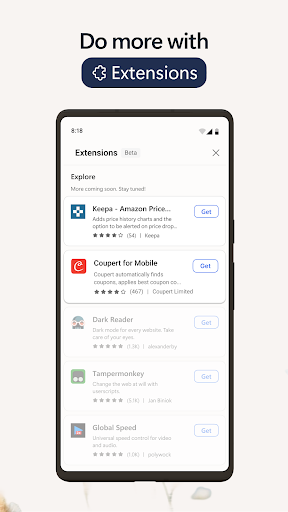
Preview the Microsoft Edge interface before downloading.

Microsoft Edge APK screenshot 1 — Communication app for Android Microsoft Edge APK screenshot 2 — Communication app for Android Microsoft Edge APK screenshot 3 — Communication app for Android Microsoft Edge APK screenshot 4 — Communication app for Android Microsoft Edge APK screenshot 5 — Communication app for Android

What is Microsoft Edge?

Browse with Microsoft Edge, your everyday web browser with built-in Copilot. From finding information to making sense of it, Copilot works alongside you to streamline everyday browsing, so you can turn ideas into action and get it done faster.

Copilot in Edge helps you search, browse, and explore, so you can make decisions faster with more confidence, all in one place. Summarize lengthy articles and videos, get answers about what you are browsing, and turn ideas into drafts or images – without breaking your flow. Whether you need a quick answer or deeper help, Copilot in Edge adapts to support how you work, right when you need it.

Stay safer with built-in security tools like tracking prevention, AdBlock Plus and Microsoft Defender Smartscreen. When you want extra privacy, switch to InPrivate mode to keep your browsing history protected.

Do more with less effort. With Microsoft Edge, everyday browsing is faster, more intuitive, and focused.

Explore the web effortlessly with Copilot built-in
• The Copilot-inspired new tab page brings together Copilot with browsing. Now your queries will get routed to search, chat or web automatically – all in one place.
• Copilot understands context across your open tabs, helping you compare information, summarize, brainstorm and connect ideas across pages, so you can move faster and make decisions with confidence without switching tabs.
• Get help from what’s on your screen. With Vision, Copilot can scan, analyze, and brainstorm with you on the content you’re browsing.
• Quickly summarize the content of the webpage, PDF or video you are viewing
• Get the right level of help for the moment—quick answers when you’re moving fast, deeper insights when you need it.

Make the most of your time online
• Microsoft Edge is a fast, reliable web browser designed to help you stay focused and get things done.
• Listen to articles and pages with Read Aloud while multitasking, using natural sounding voices in your preferred language.
• Group tabs by topic with one click to keep browsing organized and clutter free.
• Customize your experience with extensions for shopping, blocking distractions, and more.
• View webpages your way with page translation as you browse.
• Earn Microsoft Rewards points faster by browsing in Microsoft Edge.

Stay safer online
• Tracking Prevention helps protect your personal data.
• InPrivate mode keeps your activity private.
• Password monitoring alerts you if saved credentials are found on the dark web.
• AdBlock Plus blocks unwanted ads and distractions.
• Microsoft Defender SmartScreen helps protect you from phishing and malware.

Some screens are simulated, subject to change.

Key Features of Microsoft Edge APK

  • 100% Free — Download and use Microsoft Edge at no cost
  • 🏷️ Latest Version — Always updated to v150.0.4078.96
  • 📦 Lightweight — Only Varies with device download size
  • Highly Rated — 4.7/5 stars from millions of users
  • 📲 Trusted — Over 100,000,000+ downloads worldwide
  • 🔒 Safe & Verified — APK signature verified against official release
  • Fast Install — Simple one-tap installation on Android

How to Download & Install Microsoft Edge APK on Android

  1. Click the Download APK button above to get the latest Microsoft Edge APK file.
  2. On your Android phone, open Settings → Security and turn on "Install from Unknown Sources".
  3. Open your file manager and go to your Downloads folder. Find the file com.microsoft.emmx.apk.
  4. Tap the APK file and hit Install. The process takes only a few seconds.
  5. Open Microsoft Edge from your app drawer and start using it!

What's New in Microsoft Edge 150.0.4078.96

Welcome to Microsoft Edge! Here’s what’s new in this release:• Fixed some bugs and improved stability and performance.Upgrade now to enjoy a smarter, faster, and more productive Microsoft Edge.

Frequently Asked Questions about Microsoft Edge APK

Is Microsoft Edge free to download? +

Yes, Microsoft Edge is completely free. You can download and install it on any Android device at no cost, directly from Google Play or via the APK download link on this page.

Is Microsoft Edge APK safe to install? +

Microsoft Edge APK listed here is sourced from APKPure, which verifies all APK files against the original Google Play signatures before publishing. Always download APK files from trusted sources only.

What is the latest version of Microsoft Edge? +

The latest version of Microsoft Edge is 150.0.4078.96. This page is kept up to date with the most recent release from Microsoft Corporation.

What Android version does Microsoft Edge require? +

Check the App Details table above for the minimum Android version required to run Microsoft Edge.

Can I install Microsoft Edge APK without Google Play? +

Yes. Download the APK file using the Download APK button on this page, enable "Install from Unknown Sources" in your Android settings, then tap the APK to install it — no Google Play needed.

How do I update Microsoft Edge on Android? +

You can update Microsoft Edge directly through the Google Play Store, or download the latest APK from this page and install it over your existing version — no uninstall needed.

Does Microsoft Edge work on all Android devices? +

{Microsoft Edge} is compatible with most Android devices running a supported Android version or higher. It works on phones and tablets from all major brands including Samsung, Xiaomi, Huawei, Tecno, Infinix, and more.

About the Developer

Developer: Microsoft Corporation

Contact: [email protected]

Website: https://www.microsoft.com

Privacy Policy: View Privacy Policy

Download Microsoft Edge APK for Android — Free

Version 150.0.4078.96 • Varies with device • Android • Free

Last updated:

▶ Google Play ⬇ Download APK

Safe & verified APK • No malware • Signature checked

Author: NaijaApk
NaijaApk is the official Android download hub of NaijaRemix — Nigeria's #1 entertainment platform serving millions of users across Nigeria, Ghana, South Africa, and the wider African continent since 2018. Our editorial team has spent years covering Nigerian digital entertainment, and NaijaApk was created to answer one consistent question from our audience: "Where can I safely download Android apps and games in Nigeria?" Every app listed on NaijaApk goes through a simple but firm process — we confirm the APK source, check that it matches the official Google Play signature, verify the version number, and only then publish the download page. We do not host APK files directly. All downloads link to trusted sources including Google Play and APKPure. We cover all major Android categories including games, social media apps, finance and banking apps, education tools, productivity apps, and entertainment. We prioritise apps that are widely used across Nigeria and Africa — including apps that work well on lower-end Android devices common in the region. NaijaApk is a product of NaijaRemix — follow us on X/Twitter or reach us at [email protected].

Leave a Reply

Your email address will not be published. Required fields are marked *