
Firefox Fast & Private Browser APK
by Mozilla • Communication
Firefox Fast & Private Browser APK Details
Firefox Fast & Private Browser Screenshots
Preview the Firefox Fast & Private Browser interface before downloading.


What is Firefox Fast & Private Browser?
Firefox is a fast, private browser built to protect you by default. It blocks common trackers automatically, helps keep your data secure, and lets you browse with more peace of mind—without extra setup or constant decisions.
Why people choose Firefox:
✔ Enhanced Tracking Protection – Blocks trackers by default to help stop companies from following you across the web.
✔ Private browsing mode – Browse without saving your history, searches, or cookies. Private tabs lock automatically when you step away.
✔ Total Cookie Protection – Keeps tracking cookies limited to the site that created them, making cross-site tracking harder.
✔ Extensions – Add supported extensions like ad blockers and privacy tools to customize how you browse.
✔ Built-in password manager – Generate strong passwords, save them securely, and autofill logins when you need them.
✔ Flexible search options – Choose your default search engine or switch search engines right from the search bar.
✔ Reader Mode – Remove ads and clutter from articles so you can focus on what you're reading.
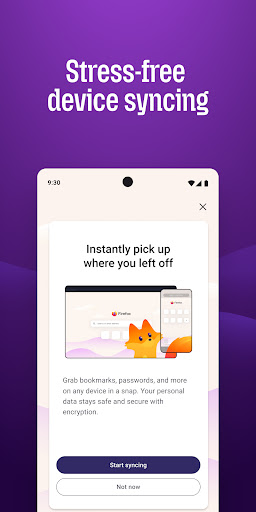
✔ Sync across devices – Pick up where you left off with synced tabs, bookmarks, and passwords when you sign in to your Mozilla account.
Private by default
Firefox is designed with privacy built in from the moment you start browsing. Enhanced Tracking Protection automatically blocks common background trackers, including social media trackers, crypto miners, and fingerprinters. Total Cookie Protection keeps your activity separated by site, making it harder for companies to build a profile of your browsing habits.
When you want extra privacy, private browsing mode doesn't save your history, searches, or cookies. Private tabs lock automatically when you navigate away and require your fingerprint, PIN, or device security to unlock—helping keep what you're doing private if someone else uses your phone.
Focus on what matters
The web can be distracting. Firefox is designed to help you stay focused without making you manage everything yourself. Reader Mode clears clutter from articles, and picture-in-picture keeps videos visible while you multitask—without pulling focus from what you're doing.
Browse your way
Customize Firefox to fit how you browse. Personalize your home screen with wallpapers and layout options, add extensions like ad blockers and privacy tools, and choose your preferred search engine instead of being pushed into a single ecosystem.
You can move the search bar to the top or bottom of the screen for easier one-handed browsing. Sign in to your Mozilla account to sync tabs, bookmarks, passwords, and browsing history across devices, so switching feels seamless.
Built for people, not profit
Firefox was created in 2004 by Mozilla as a faster, more private, and more customizable alternative to other browsers. Today, Mozilla remains a nonprofit and continues working to make the internet — and the time you spend on it — better.
Learn more about Mozilla: https://www.mozilla.org
Terms of Use: https://www.mozilla.org/about/legal/terms/firefox/
Privacy Policy: https://www.mozilla.org/privacy/firefox
Latest news: https://blog.mozilla.org
Key Features of Firefox Fast & Private Browser APK
- ✅ 100% Free — Download and use Firefox Fast & Private Browser at no cost
- 🏷️ Latest Version — Always updated to v153.0.1
- 📦 Lightweight — Only Varies with device download size
- ⭐ Highly Rated — 4.6/5 stars from millions of users
- 📲 Trusted — Over 100,000,000+ downloads worldwide
- 🔒 Safe & Verified — APK signature verified against official release
- ⚡ Fast Install — Simple one-tap installation on Android
How to Download & Install Firefox Fast & Private Browser APK on Android
- Click the Download APK button above to get the latest Firefox Fast & Private Browser APK file.
- On your Android phone, open Settings → Security and turn on "Install from Unknown Sources".
- Open your file manager and go to your Downloads folder. Find the file
org.mozilla.firefox.apk. - Tap the APK file and hit Install. The process takes only a few seconds.
- Open Firefox Fast & Private Browser from your app drawer and start using it!
What's New in Firefox Fast & Private Browser 153.0.1
Frequently Asked Questions about Firefox Fast & Private Browser APK
About the Developer
Developer: Mozilla
Contact: [email protected]
Website: https://www.mozilla.org/firefox/mobile/
Privacy Policy: View Privacy Policy
Download Firefox Fast & Private Browser APK for Android — Free
Version 153.0.1 • Varies with device • Android • Free
Last updated:
Safe & verified APK • No malware • Signature checked
