
UC Turbo- Fast, Safe, Ad Block APK
by UCWeb Singapore Pte. Ltd. • Communication
UC Turbo- Fast, Safe, Ad Block APK Details
UC Turbo- Fast, Safe, Ad Block Screenshots
Preview the UC Turbo- Fast, Safe, Ad Block interface before downloading.


What is UC Turbo- Fast, Safe, Ad Block?
UC Turbo brings you fast video download, mini ads block, data saver, free cloud acceleration(powerful as VPN), share files to whatsapp, easy to search, private & safe browsing, video playing in background, watch cricket matches offline, pesonalized wall picture HD, multi-language and homepage customizable to optimize your using experience.
✪Main features✪
■ Minimalist Design
■ Fast Video Download
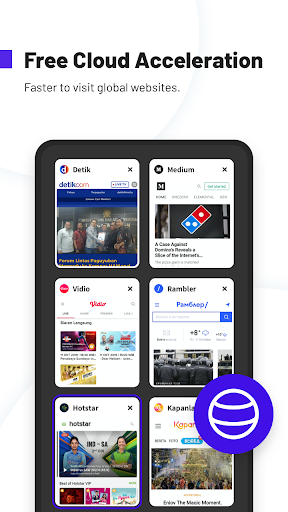
■ Free Cloud Acceleration
■ Private Space
■ Data Saving
■ Useful Tools Kit
■ Switch Tab on Toolbar
■ Secure Browsing
■ Ad Block
■ Video playing in background
■ Homepage Customizable
■ Watch Video Offline
■ Night Mode
■ Personalized Wallpaper HD
■ Support Multi-language
Minimalist Design
No news flow, no push message, simple but smart design brings you clean and convenient browsing experience.
Fast Video Download
Our servers speed up and stabilize downloads. By setting high download threads, your download speed may enhance a lot.
Free Cloud Acceleration
Free cloud acceleration help you visit websites and watch videos around the world anytime at anywhere.
Private Space
Users enable to hide downloaded online videos or files and encrypt with password, creating a privately-owned space.
Data Saving
UC Browser Turbo helps you use less mobile data to control your data budget. Whether you're downloading or browsing, UC Turbo always saves 90% data.
Useful Tools Kit
With a series of tools like status downloader, network speed test, image search, you just need to open UC Turbo to own them.
Switch Tab on Toolbar
It is a special feature which can save your time and give you smooth browsing. Just move your finger on toolbar, tabs can be switched quickly. Open and Delete options are added now!
Secure Browsing
Incognito mode helps you to browse in private. Your browsing history will not be recorded in this mode.
Ad Block
Ad Block function blocks different forms of ads that effect your browsing experience. Also you can mark them manually to block ads with same style in future.
Video playing in background
It supports one-tab to play videos in background, even with incognito mode. You can listen your videos when you do other things.
Personalized Wallpaper HD
Set your favorite photos on your phone as wallpapers and share them to social platform with one click.
Homepage Customizable
You can decide your own homepage. Add your favorite sites to homepage from Bookmarks (add sites to Bookmarks first), or delete all built-in sites to have a blank homepage. You can also set your own picture as unique wallpaper. It’s all up to you.
Watch Video Offline
Download your favorite videos in advance so that you can watch them anywhere or anytime as you wish, even in situation without any network.
Support Multi-language
Multi-language customized for you. Choose the language that suits you to achieve barrier-free browsing.
Night Mode
Night mode is more eye friendly and allows you to browse more comfortably at night.
For help & feedback, please go to feedback pages in Settings. Thank you.
More about UC Turbo
Facebook: https://www.facebook.com/UC-Turbo-100571184627491/
Official Website: https://turbo.ucweb.com
Key Features of UC Turbo- Fast, Safe, Ad Block APK
- ✅ 100% Free — Download and use UC Turbo- Fast, Safe, Ad Block at no cost
- 🏷️ Latest Version — Always updated to v1.10.6.900
- 📦 Lightweight — Only Varies with device download size
- ⭐ Highly Rated — 4.1/5 stars from millions of users
- 📲 Trusted — Over 50,000,000+ downloads worldwide
- 🔒 Safe & Verified — APK signature verified against official release
- ⚡ Fast Install — Simple one-tap installation on Android
How to Download & Install UC Turbo- Fast, Safe, Ad Block APK on Android
- Click the Download APK button above to get the latest UC Turbo- Fast, Safe, Ad Block APK file.
- On your Android phone, open Settings → Security and turn on "Install from Unknown Sources".
- Open your file manager and go to your Downloads folder. Find the file
com.ucturbo.apk. - Tap the APK file and hit Install. The process takes only a few seconds.
- Open UC Turbo- Fast, Safe, Ad Block from your app drawer and start using it!
What's New in UC Turbo- Fast, Safe, Ad Block 1.10.6.900
Frequently Asked Questions about UC Turbo- Fast, Safe, Ad Block APK
About the Developer
Developer: UCWeb Singapore Pte. Ltd.
Contact: [email protected]
Website: http://www.ucweb.com
Privacy Policy: View Privacy Policy
Download UC Turbo- Fast, Safe, Ad Block APK for Android — Free
Version 1.10.6.900 • Varies with device • Android • Free
Last updated:
Safe & verified APK • No malware • Signature checked
